Getting Started with Trendos
Last updated: March 12, 2026
This guide will walk you through your first login and explain how to navigate your main dashboards so you can quickly access the insights that matter most to your brand.
1. Sign In and Select Your Brand
Sign in to Trendos using your registered email address.
Enter your brand name in the search field.
Select your brand from the dropdown menu.
Can’t Find Your Brand?
If your brand does not appear in the search results, select Request Brand Tracking.
Our database currently tracks more than 3000 industries and 30,000+ top-searched prompts, capturing over 2.5 million brands. If a specific brand is missing, it’s usually because it lacks visibility on LLMs or its specific industry isn’t live on Trendos yet.
Trendos solution:
Custom Prompts: All of our plans including the free plan, allows you to add custom prompts to track exactly what you need. Using custom prompts you can search for the content most relevant to your brand.
2. Understand Your Main Dashboard
After selecting your brand, you will land on your Main Dashboard, which provides a week performance overview.
Here’s what you’ll see:
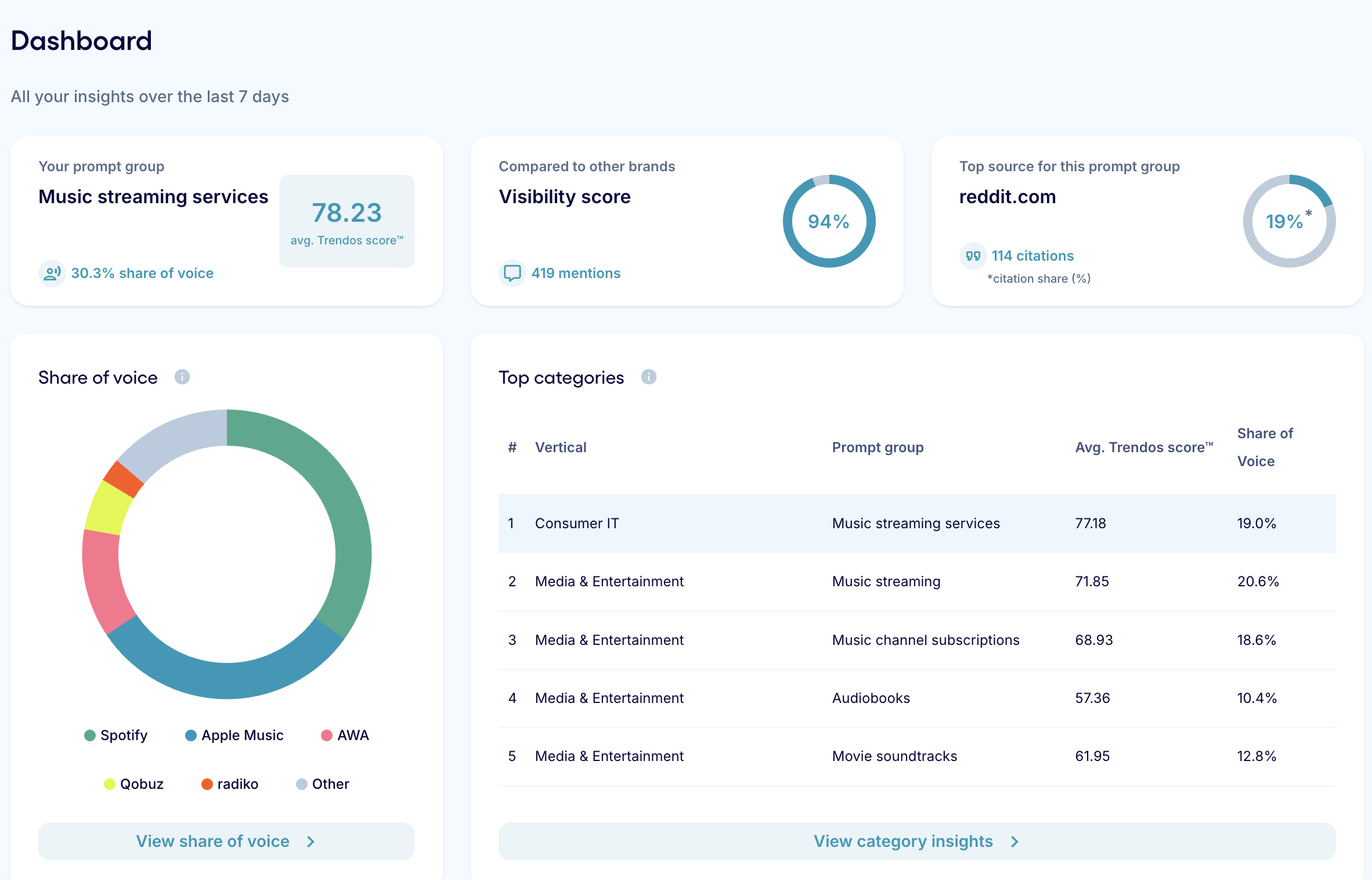
Core Metrics in the main dashboard:
Your Prompt Group – The primary conversation category where your brand appears.
Average Trendos Score – Your average position across tracked prompts. The closer the result is near 100, the better visibility of the brand.
Share of Voice (SoV) – Your brand’s proportion of visibility compared to competitors.
Visibility Score - A normalized score reflecting how prominently your brand appears in AI-generated results.
Top Source - The source most frequently associated with your brand mentions.
Competitive Insights
How you rank compared to your primary competitors
Total number of brand mentions during the selected period
This dashboard is designed for executive-level visibility. It provides a snapshot of your brand’s AI presence without requiring deep analysis.
Need a Definition?
If you’re unsure about a specific metric or term, refer to the Trendos Vocabulary section. This resource explains all scoring models, ranking methodologies, and terminology used throughout the platform.
4. Deep Dive: Brand Insights
For more detailed analysis, navigate to Brand Insights from the left sidebar.
In the “Overview” Section, You Can:
Select a custom date range
Filter by Prompt Group
Analyze a specific Prompt
Choose an LLM (Large Language Model)
Filter by Country (the country that is set by default is the one where your brand was mentioned most times).

This allows you to segment performance by market, model, or conversation type — particularly useful for SEO specialists and brand analysts evaluating strategy impact.
Within this section, you can explore:
Ranking trends
Mentions over time
Share of Voice
Visibility Score
Position distribution
Sentiment breakdown
5. Prompt Analysis
Under Prompt Analysis, you can evaluate performance at the individual prompt level.
This section helps answer strategic questions such as:
In which conversations does our brand dominate?
Where are we underrepresented?
How does sentiment vary by topic?
What is our ranking per prompt?
You’ll see:
Visibility Score per prompt
Position per prompt
Sentiment distribution per prompt
This is particularly valuable for identifying content gaps and optimization opportunities.
6. Citations
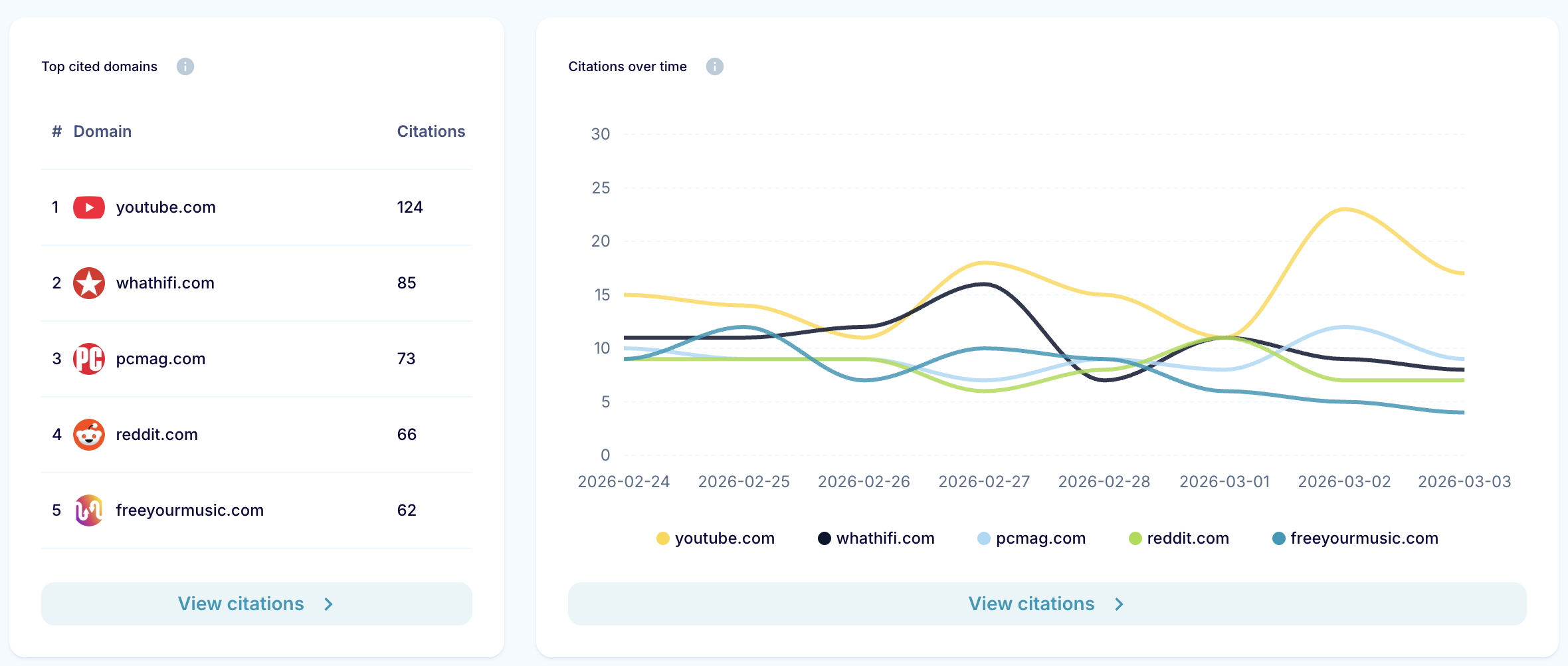
The Citations section shows the sources most frequently associated with your brand mentions.
Use this to:
Identify high-impact publications
Discover which domains influence AI visibility
Inform PR and link-building strategy
7. AI Model Insights
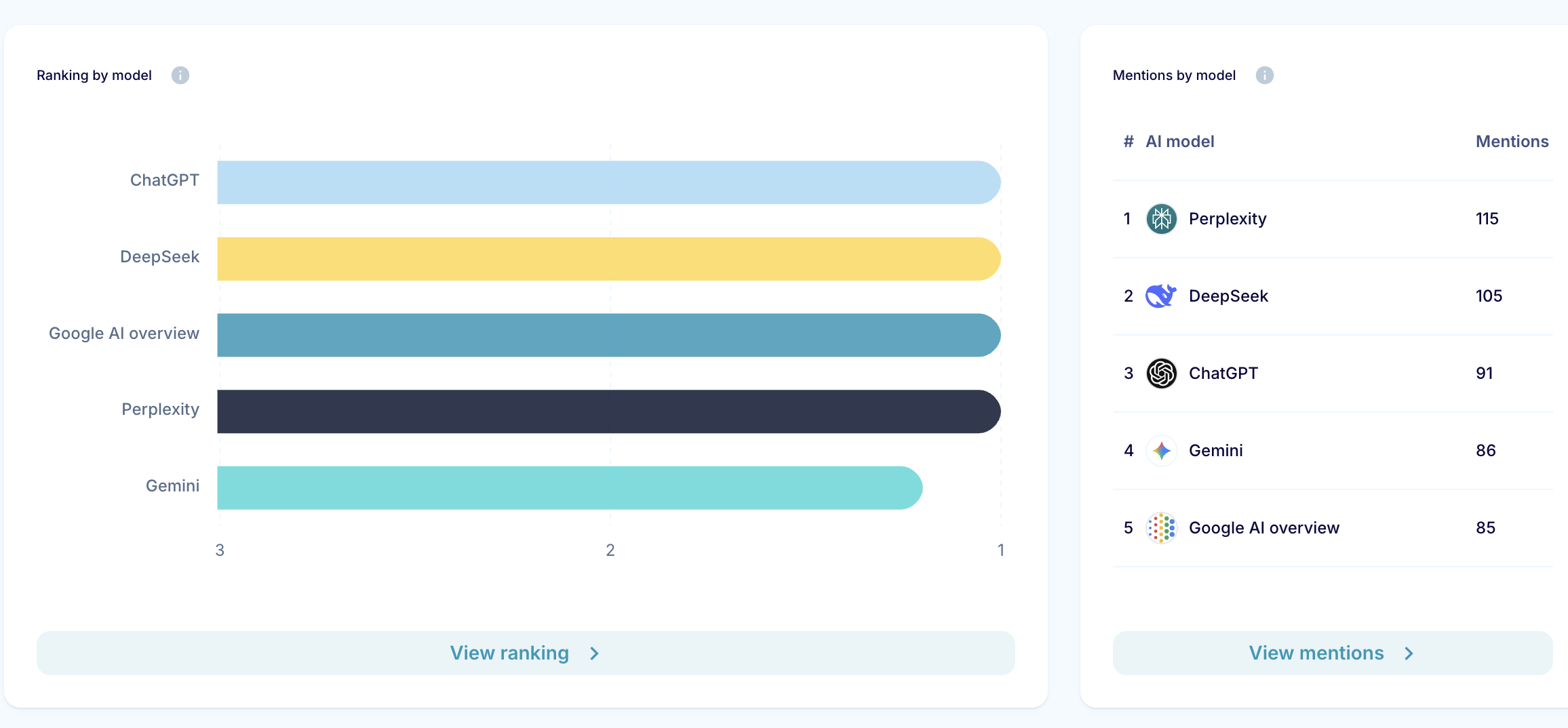
In AI Model Insights, you can compare brand performance across different Large Language Models.
This section shows:
Ranking by LLM
Which LLM mentions your brand most frequently
Visibility Score per model
Share of Voice per model
Sentiment by model
Average position per model
This is essential for teams tracking how brand presence varies across AI ecosystems.
What to Do Next?
If you are new to Trendos, we recommend:
1. Reviewing your week's dashboard snapshot
2. Exploring Brand Insights with custom filters
3. Identifying underperforming prompts in Prompt Analysis
4. Reviewing top citations to inform SEO and PR strategy